
Start with your question.
Type it as you would ask your team. Compare branch sales, explore a reporting period, or look into a product.
Grounded in your connected data
Every branch has a story.
Get the answers behind yours.
Ask questions about your sales, stock and stores. Turn your existing business data into a clearer view of what to do next.
Book a personalised demo Take a closer look ↓
You know your business. IgniInsights helps you explore the numbers behind it, in language that feels natural.
Compare sales across locations, with the reporting period and source scope right beside the answer.
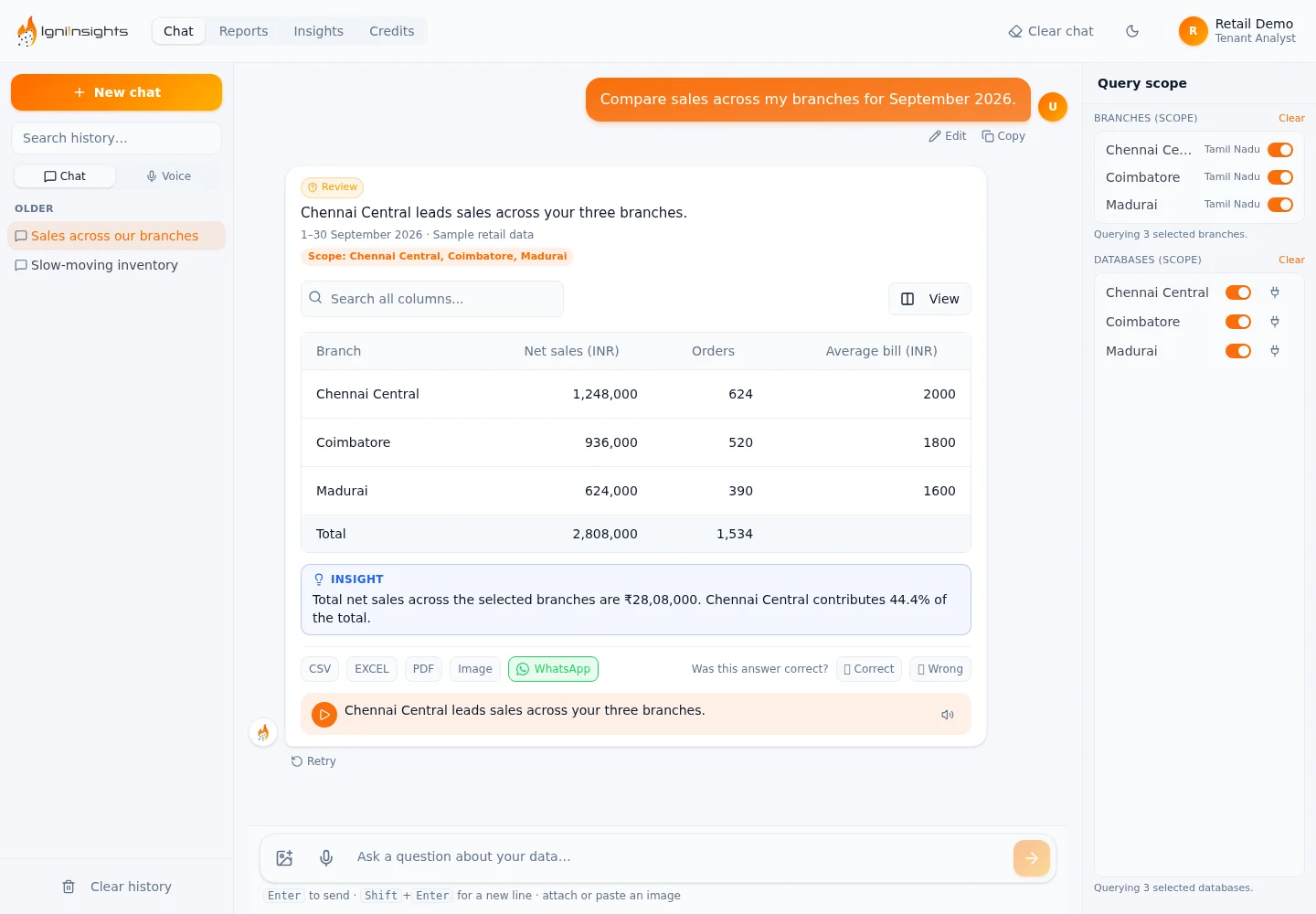 IGNIINSIGHTS / SALES PERFORMANCE
A connected view of your business, from the first question to the next decision.
Type it as you would ask your team. Compare branch sales, explore a reporting period, or look into a product.
See the branches behind the answer. Follow the figures in a clear table and ask a follow-up when you need more detail.
Switch to Insights to review slow stock and sales changes. See the supporting evidence, then mark an item done or come back to it later.
Open your configured reports, select the period, and export the detail. Set up report delivery and schedules when your team is ready.
Type it as you would ask your team. Compare branch sales, explore a reporting period, or look into a product.
See it with your business questions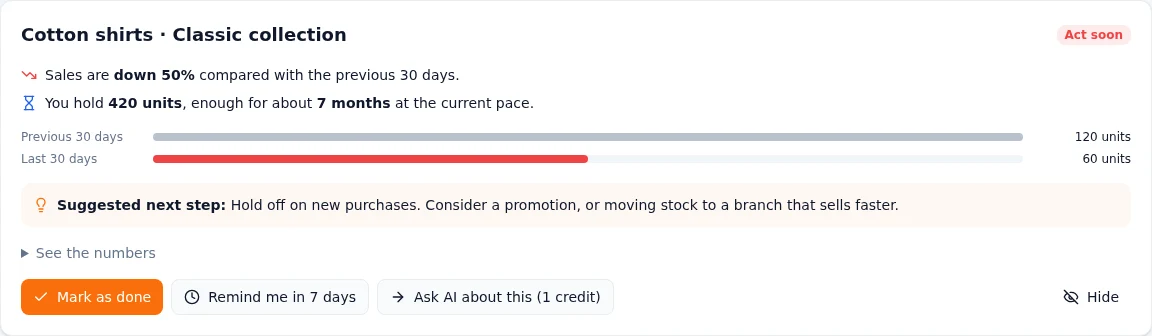
Sales changes and slow-moving products deserve a closer look. Review the evidence behind each insight, then decide whether to investigate, follow up, or revisit it later.
Open a report, choose your period, and bring the figures into the conversation. Export the results or configure report delivery for the people who need them.
WhatsApp delivery and scheduled reports require configuration, recipient setup and supported templates.
Find your reporting workflow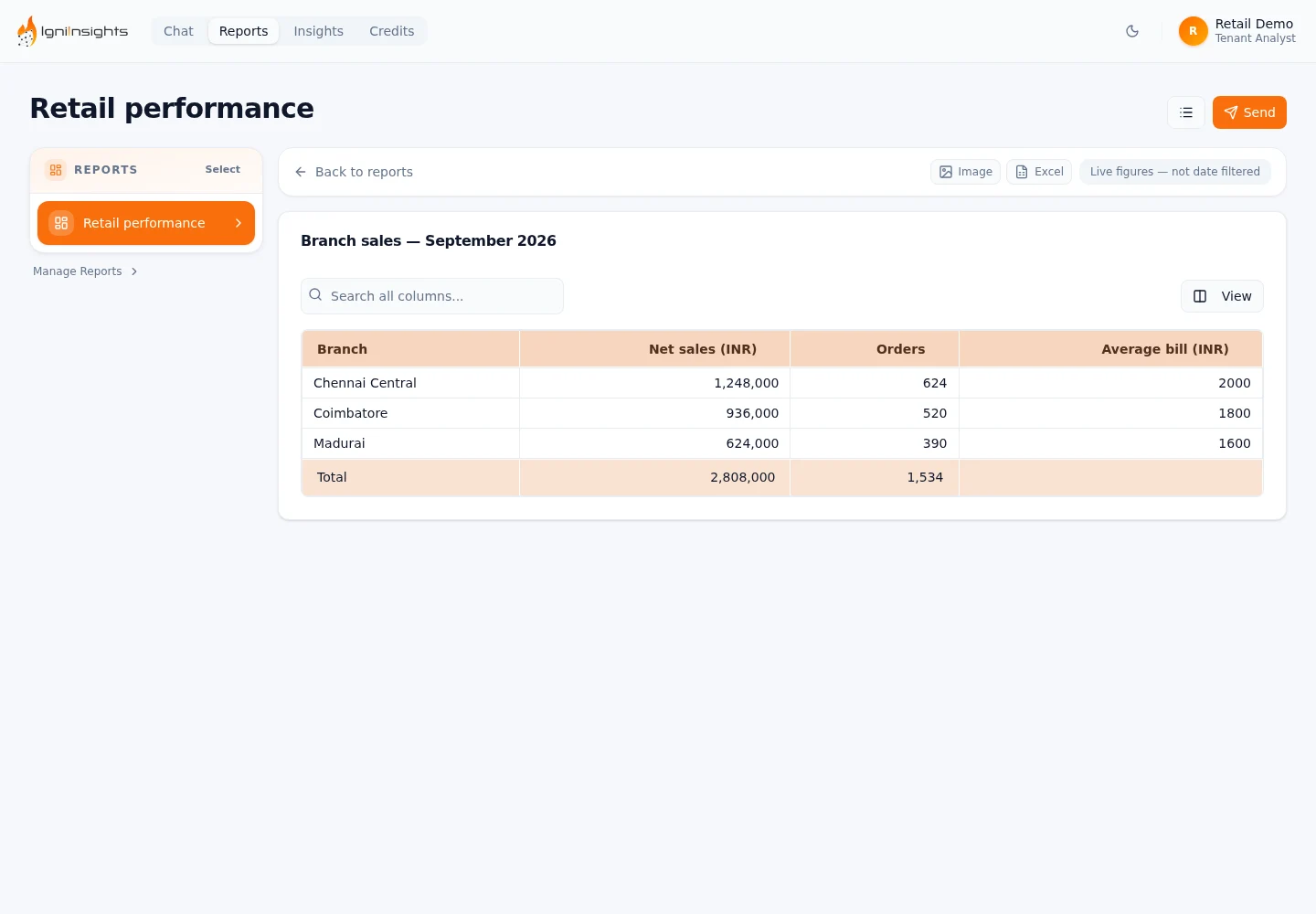
We start by understanding your stores and the questions that matter. Then we connect the right sources.
Review database compatibility and establish read-only access to the business data you want to explore.
Configure branches, define the terms your team uses, and check representative questions together.
Explore answers, review reports, and help your team build the workflow that fits its day.
Understand what is connected, how queries are checked, and what information is processed before your team gets started.
Read about data handlingQueries are validated before execution. Source connections should use read-only database credentials.
Tenant identities are restricted to their assigned data sources, with separate administrative capabilities.
Provider and deployment choices affect how information is processed. Review them with us during onboarding.
Your branches, data sources and reporting needs shape the right setup. We’ll walk through the product, confirm compatibility and explain onboarding and usage costs.
Book a personalised demoHave something specific in mind?
Let’s talk about your setup
IgniInsights connects to supported databases behind your business systems. We review your software, database access and reporting needs during the demo. Compatibility depends on your setup; it is confirmed before onboarding.
Yes. Connected branches can be selected and compared where their data supports the question. Answers show the selected scope, and partial results are identified when a source is unavailable.
You can ask questions in everyday language. Your team configures the business context and data sources during onboarding, so the product can interpret the metrics and terms you use.
The analytics query path validates queries before execution and is designed for read-only source connections. Connection permissions and deployment settings are checked during onboarding.
Report delivery and schedules are available with the required WhatsApp configuration, recipient setup and templates. We will confirm the options and dependencies for your deployment.
We discuss your branches, current reports and business questions, then walk through the relevant product workflows. The initial demo does not require you to share database credentials.
We scope the setup around your branches, data sources, onboarding needs and enabled capabilities. AI usage credits are part of the product. Your proposal will explain the commercial terms before you commit.